Lesson 4 of 6 in On the workbench
Building circuits on a breadboard
By Mihai Dumitru · · 6 min read
A breadboard lets you build a circuit by pushing parts and wires into holes, without soldering. Under the holes are metal spring clips that grip the legs and connect them. Nothing is permanent, so you can change a circuit in seconds and use the parts again. This page explains which holes are connected and how to turn a circuit diagram into a working circuit on the board.
What is connected inside
A standard breadboard has two areas. In the middle area the holes are arranged in numbered rows of five, marked a to e on one side of a central gap and f to j on the other. The five holes of a row on one side are connected to each other by a single clip. Nothing else is connected: the next row is separate, and the gap separates the left half of each row from the right half.
Along the long edges run the power rails, usually marked with a red line for + and a blue or black line for −. All the holes along one rail are connected, so you can bring the supply to any part of the board. On some long breadboards the rails are split in the middle, which is easy to miss. If one end of your circuit seems to have no power, check that first.
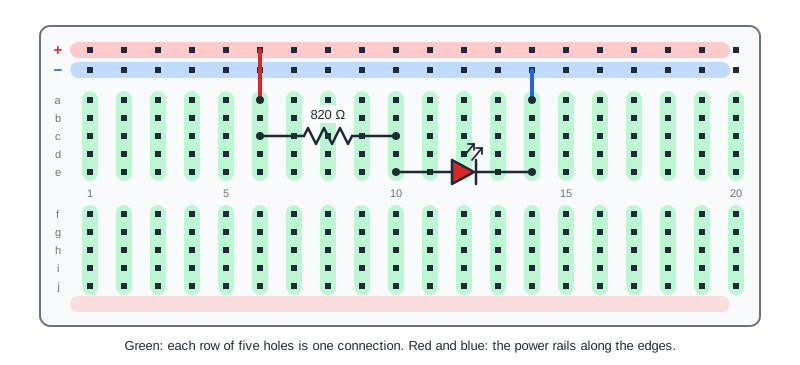
Building an LED circuit
Here is the LED circuit from the LED resistor page, a 9 V battery with an 820 Ω resistor and a red LED, built step by step:
- Connect the battery clip to the power rails: red wire to the + rail, black wire to the − rail. Leave the battery disconnected until the circuit is finished.
- Push one leg of the resistor into the + rail and the other into a hole in row 10.
- Push the LED's longer leg, the anode, into row 10 as well, and its shorter leg, the cathode, into row 14.
- Add a short wire from row 14 to the − rail.
- Check every connection against the diagram, then connect the battery.
Follow the path the current takes: from the + rail through the resistor into row 10, through the LED into row 14, and through the wire back to the − rail. Each row is one junction in the diagram. That is the general method: give each connection point in the diagram its own row, then plug in every part that touches that point.
Chips
Chips in the common DIP package, with two rows of legs, sit across the central gap, one row of legs on each side. That way each leg gets its own row and nothing is shorted. The 555 timer is placed this way.
Mistakes that stop circuits working
- Both legs of a part in the same row. The row connects them, so the part is short-circuited and does nothing.
- An LED the wrong way round. It stays dark. Turn it around.
- A split power rail on a long board, so half of the rail has no power.
- Legs that are not pushed in far enough, or wires with bent ends. A gentle tug shows whether a part is gripped.
- Parts placed one row off, which is the most common mistake of all. Count the row numbers.
When something doesn't work, disconnect the battery and compare the board with the diagram row by row. Then use a multimeter on the powered circuit: the voltage across each part shows where the current stops.
Check yourself
Which holes on a breadboard are connected to each other?
Show the answer
The five holes of a row on the same side of the central gap, and all the holes along one power rail. Everything else is separate.
You put both legs of a resistor into row 5. What happens?
Show the answer
The row connects both legs together, so the resistor is bypassed and has no effect on the circuit.
Why do chips sit across the gap in the middle?
Show the answer
So that each leg gets its own row. If a chip sat on one side, the legs facing each other would share rows and be shorted.
Half of your circuit on a long breadboard has no power. What would you check first?
Show the answer
Whether the power rails are split in the middle. A short wire across the break joins the two halves.